1337UPEasyCTF Challenge
Layers
Layers
2024-11-17
##Challenge Name: Layers
###Solves
- >Solves: 126
- >Points: 50
###Description
Weird way to encode your data, but OK! 🤷♂️
Attachment: layers.zip
###Approach
- >
Initial Steps:
- >Extracted the provided layers.zip file and found several files numbered from 0 to 55.
- >Concatenated all the files from 0 to 55 using the following script:
bash
for i in {0..55}; do cat "$i" done - >The concatenated output was a long binary string:
0011001001001101001110010100111001010010011110000011010101001110010100100101011001110101010011100101011001001110010001000111101001111010011000010110001101110011011001110111001101010110010010000101001101010101010011100100111000111001011001000101011001001010010100110100111001100010011110100011001101100110011010100101010101101010010011100100001001001001011010100101010101100100011010110101001101100110011110100011100101100101010001000110111101010011 - >Converting the binary string to text didn't make much sense initially:
2M9NRx5NRVuNVNDzzacsgsVHSUNN9dVJSNbz3fjUjNBIjUdkSfz9eDoS
- >
Discovering the Timestamp-based Order:
- >After some tinkering, it became clear that the files were extracted randomly. I noticed the timestamps on the files.
- >The files should be concatenated in order of their last modification timestamps (oldest to latest), not based on their filenames.
- >To fix this, ran the following command to list the files by modification time and concatenate them in the correct order:
bash
ls -ltr | awk '{print $9}' | tail -n +2 | xargs -I{} cat {}

Image1 - >
Binary to Text:
- >After rearranging the files based on their timestamps, the new binary string appeared:
0101001101010101001101010101010101010011010101010110010001010011010100110101011001010010010010100110010101111010011001000110111101001101001100110100100101111010010011100101011000111001011100110100111001001000011010110111101001100011011010100101011001100110010011100111101001000010011001100100111000110010011001110111100001001110010101100011100101101010011000010100010001010010011100110110001001000100010011100111010101001110011010100100111000111001 - >Converting this binary string to ASCII text:
SU5USUdSSVRJezdoM3IzNV9sNHkzcjVfNzBfN2gxNV9jaDRsbDNuNjN9
- >After rearranging the files based on their timestamps, the new binary string appeared:
- >
Decoding Base64:
- >The string looked like base64 encoded data.
- >Decoded the base64 string to get the flag:
INTIGRITI{7h3r35_l4y3r5_70_7h15_ch4ll3n63}
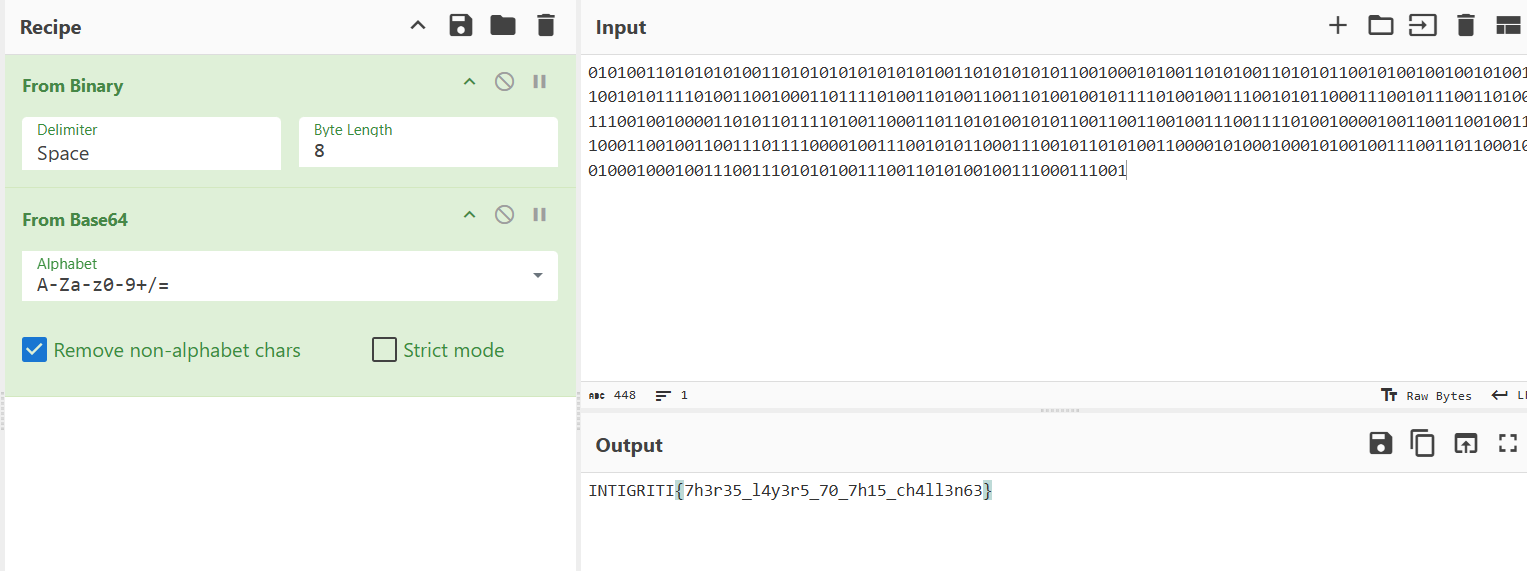
Image2
###Flag
INTIGRITI{7h3r35_l4y3r5_70_7h15_ch4ll3n63}